
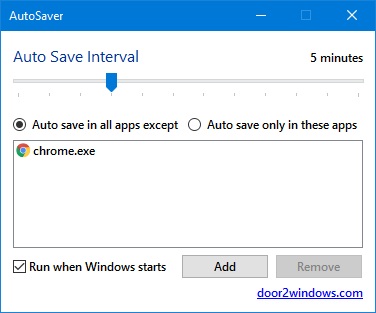
AutoSaver is a freeware from door2windows that automatically keeps pressing Ctrl + S for you after an interval of time (like every minute). You never have to worry about forgetting to save a file again.
If you are using Windows 7 or earlier, you'll have to install .NET Framework 4 first.
Apps from door2windows are truly free and DON'T include any offers to install 3rd-party apps/adware/toolbars/unwanted software and never will. The apps are portable and don't require installation.
Download door2windows App Bundle
door2windows App Bundle gives you access to all the latest apps released by door2windows in one download (along with future updates).How To Use
Download the app and keep it somewhere from where you won't move it (if you move the files you'll have to click Run when Windows starts again).
Run the app just once. Don't run it multiple times because you don't see any window.
You'll see a save icon in the system tray/notification area. Click it.

The preferences window opens. Here you can set three things:
Auto Save Interval: This is the interval of time after which Ctrl + S automatically gets pressed. You can set this from 1 minute to 5 hours.
Auto save in all apps except and Auto save only in these apps: Select Auto save in all apps except if you want to auto-save in all apps except the ones that you added in the list and select Auto save only in these apps if you want to auto-save only in the apps that you have added to the list. To add an app to the exclusion/inclusion list click Add and browse for the app. For instance, if you choose Auto save in all apps except and add Chrome to the list, AutoSaver will automatically press Ctrl + S if the active app is not Chrome.
Run when Windows starts: Checking this option will automatically start AutoSaver every time Windows starts.
Click the close button in the window. This won't exit the app, it'll still be running and visible in the system tray. AutoSaver can only auto press Ctrl + S when it is running. If you ever want to exit the app, right-click the icon in the system tray and select Exit.