
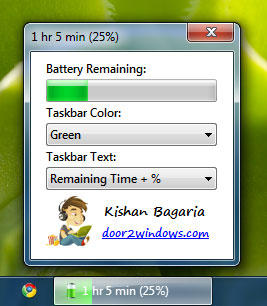
Windows 7 Battery Bar is a freeware from door2windows that monitors the status of your battery and displays it in the taskbar.
Download Windows 7 Battery Bar
Apps from door2windows are truly free and DON'T include any offers to install 3rd-party apps/adware/toolbars/unwanted software and never will. The apps are portable and don't require installation.
Download door2windows App Bundle
door2windows App Bundle gives you access to all the latest apps released by door2windows in one download (along with future updates).To customize the settings click on the the Battery icon in the system tray. You can change the taskbar color to Red, Green, Yellow & Auto. If you change the color to Auto then it will change the color according to the remaining battery percentage:
100% - 50% = Green
49% - 11% = Yellow
10% - 0% = Red

You can also change the taskbar text to None, Remaining %, Remaining Time + % & Power Status:
